

👁 0 views
Want to try Google AI Ultra with 30 TB of storage? Check the offer on the Google account you plan to use. This guide explains how to find the 30 TB plan, review the amount due, and check the renewal date after subscribing.
Before you confirm: Check the amount due today, the length of the offer, and the next billing price. If YouTube Premium is included, review its terms and billing schedule too.
Table of contents 9 items
- What comes with Google AI Ultra 30 TB?
- How to install the Ultra 30 TB extension
- Check pricing before confirming
- Using a virtual debit card
- Confirm your plan and manage renewal
- What a successful subscription looks like
- Frequently asked questions
- Why does my account not show a USD 0 offer?
- What does GOOGLE *TEMPORARY HOLD mean?
What comes with Google AI Ultra 30 TB?
Google AI Ultra is a subscription with expanded access to Google’s AI tools. Depending on the plan, storage is either 20 TB or 30 TB. YouTube Premium availability varies. See Google AI Ultra benefits.
Step 1. Download and install the Chrome extension
How to install the Ultra 30 TB extension
- Download the archive from Fshare and extract it to a folder.
- Type
chrome://extensions/in Chrome’s address bar and press Enter. - Turn on Developer mode in the upper-right corner.
- Click Load unpacked, select the folder that directly contains
manifest.json, and confirm. - Click the puzzle-piece icon in Chrome’s toolbar and open the extension labeled Dùng thử Google AI Ultra. You can pin it for easier access.

The Fshare download has not been verified. You can check and claim offers directly on Google One. The extension can modify the checkout page, so disable it before entering card details or confirming a subscription.
Step 2. Install the VPN and connect to a US server
- Open the Chrome Web Store and add VeePN to Chrome.
- Open VeePN from the toolbar and choose United States → Oregon if it appears in the list.
- Click Connect and wait for the connected status. Then open Google One and check the offer shown on your account.
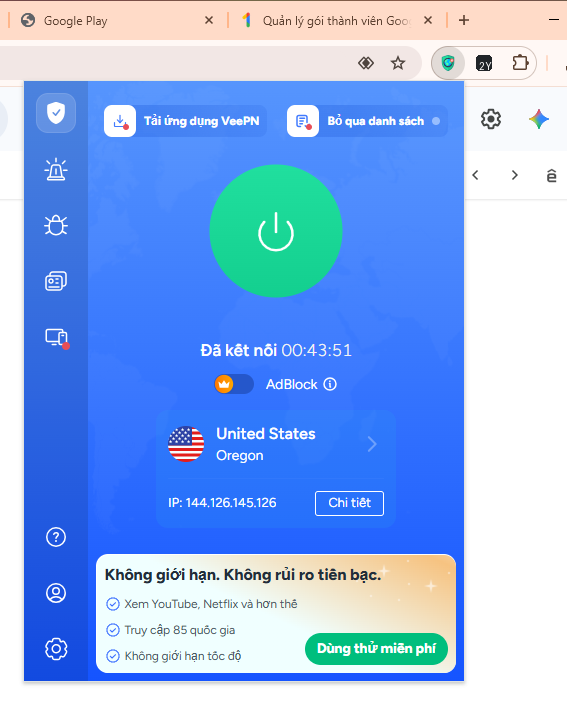
A VPN changes your browser’s IP address. Google still determines offer eligibility and pricing. Use your actual billing address. See the earlier Google AI Pro guide.
Step 3. Find Google AI Ultra 30 TB and sign up
- Open https://one.google.com/ and sign in with the account you plan to use.
- Find Google AI Ultra 30 TB. Double-check the storage amount if a 20 TB option also appears.
- If Google shows a trial offer, open it to review the checkout details.

Check pricing before confirming
If Google asks for a payment method, use a valid card and accurate billing details. Review these three items at checkout:
- Due today: If you only want a free trial, stop if the amount due is above zero.
- Offer duration: Use the trial period shown on the confirmation screen.
- Next billing cycle: Note the renewal price and date. Check each service if there are add-ons.

Using a virtual debit card
If you need to add a card, consider a virtual international debit card or a spare debit card linked to a separate account. Keeping less than VND 30,000 in that account is an optional precaution if you forget to cancel and a renewal charge is attempted. Separating it from your main spending account can also limit exposure if the card details are compromised.
VND 30,000 is only a reference amount. A low balance can cause card verification to fail. To stop renewals, set a reminder and cancel Google One before the billing date. If you suspect your card details have been compromised, lock the card and contact the issuer.
- VPBank NEO: Choose an international Visa debit card and select virtual issuance. VPBank instructions.
- Techcombank Mobile: Open the cards menu, choose an international payment card, and look for the virtual issuance option before verification. Techcombank instructions.
- MBBank app: Open the cards menu and check for a virtual Visa Debit option. Review the fees and online payment terms in the app. MB information.
Confirm your plan and manage renewal
- Check your Google confirmation email for the plan name, storage, offer duration, and price.
- Check your status in Google One settings or Google Play subscriptions using the account that subscribed.
- If you only want the trial, review when your benefits end and cancel before the billing date. Verify the status and confirmation email afterward.

What a successful subscription looks like

Frequently asked questions
Why does my account not show a USD 0 offer?
Pricing and offers depend on your account’s eligibility. Use the amount shown on Google’s confirmation screen when deciding whether to subscribe.
What does GOOGLE *TEMPORARY HOLD mean?
It may be a temporary authorization used to verify your payment method. Google says pending authorizations may remain visible for 1 to 14 business days, depending on the bank. If the authorization is still pending after that, contact your card issuer. Read Google’s explanation of temporary authorizations.

Sharing computer, Windows and software tips. If you have a question, leave a comment below.