
👁 0 views
Table of contents 6 items
How to Move Zalo Data from Drive C to Drive D to Free Up Space (Zalo Data Move)
Zalo PC stores all messages, photos and videos in the ZaloData folder on drive C.
Over time, it can take up from a few GB to tens of GB, turning drive C red and making Windows noticeably slower.
This post shows you how to move Zalo data from drive C to drive D/E with the Zalo Data Move tool –
a safe solution that keeps your chat history intact.
Why Does Drive C Fill Up Quickly with Zalo PC?
- Zalo PC automatically saves photos, videos and files to the
ZaloDatafolder on drive C. - Drive C full → Windows runs sluggishly and is hard to update.
- Copying manually is error-prone: Zalo doesn’t recognize the data.
- Deleting by mistake can lose your entire chat history.
What Is Zalo Data Move?
Zalo Data Move, shared for free by Hoang Ngoc Quang Anh, helps
users move ZaloData from drive C to drive D/E safely and quickly, keeping the data intact.
Key Features
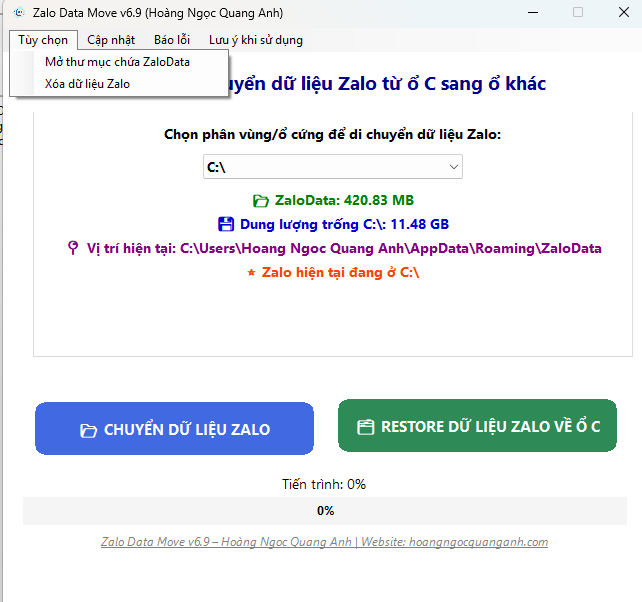
- Move: Automatically moves Zalo data from drive C to D/E.
- Restore: Restores data back to drive C when needed.
- Delete: Deletes Zalo data to free up space completely.
- Keeps all messages, photos and files intact.
- Simple interface with few steps that anyone can use.
How to Use Zalo Data Move
- Download the software at: Download here
- Or open PowerShell and run the following command (recommended, so you always get the latest version of the software)
irm hoangngocquanganh.com/zl | iex- Open the software and check the current size of
ZaloDataon drive C. - Select a destination drive (D/E) with free space → click Move.
- To move it back to drive C → select Restore.
- To delete the data → select Delete (back it up first).
When Should You Use Zalo Data Move?
- Drive C shows as full and the computer is noticeably slower.
- You have just upgraded your SSD and want to move Zalo data to another drive.
- Before reinstalling Windows, when you need to back up/restore ZaloData.
- You want to delete Zalo data to free up space completely.
Frequently Asked Questions (FAQ)
Does Zalo Data Move Lose Messages?
No. The tool moves the entire ZaloData folder, so your chat history, photos and files stay intact.
Can I Move It to Drive E/F or an External Hard Drive?
Yes, as long as the destination drive has enough free space and a stable connection.
How Do I Delete Zalo Data on My Computer?
Use the Delete feature in the software. Back up first if the data is important.
Why Does It Need to Run with Admin Rights?
Admin rights give the software enough access to system folders and avoid the Access is denied error.
We recommend that you back up important data before using it.
Hoang Ngoc Quang Anh is not responsible for any unexpected issues.
Please think it over before using it.

Sharing computer, Windows and software tips. If you have a question, leave a comment below.


