👁 0 views
Today I’m sharing hundreds of decorative pattern vectors that you can use a lot when making typography.


It’s very simple to use 😀 ✌
download them 😀 ?
See the preview images in the files with the .jpg extension.
Use the Photoshop version you have to open the file with the .eps extension
A settings box appears; adjust it however you like,
Click OK.

After it opens, go to Select on the Photoshop toolbar ( here I’m using Adobe Photoshop CS6).
Next, choose Color Range
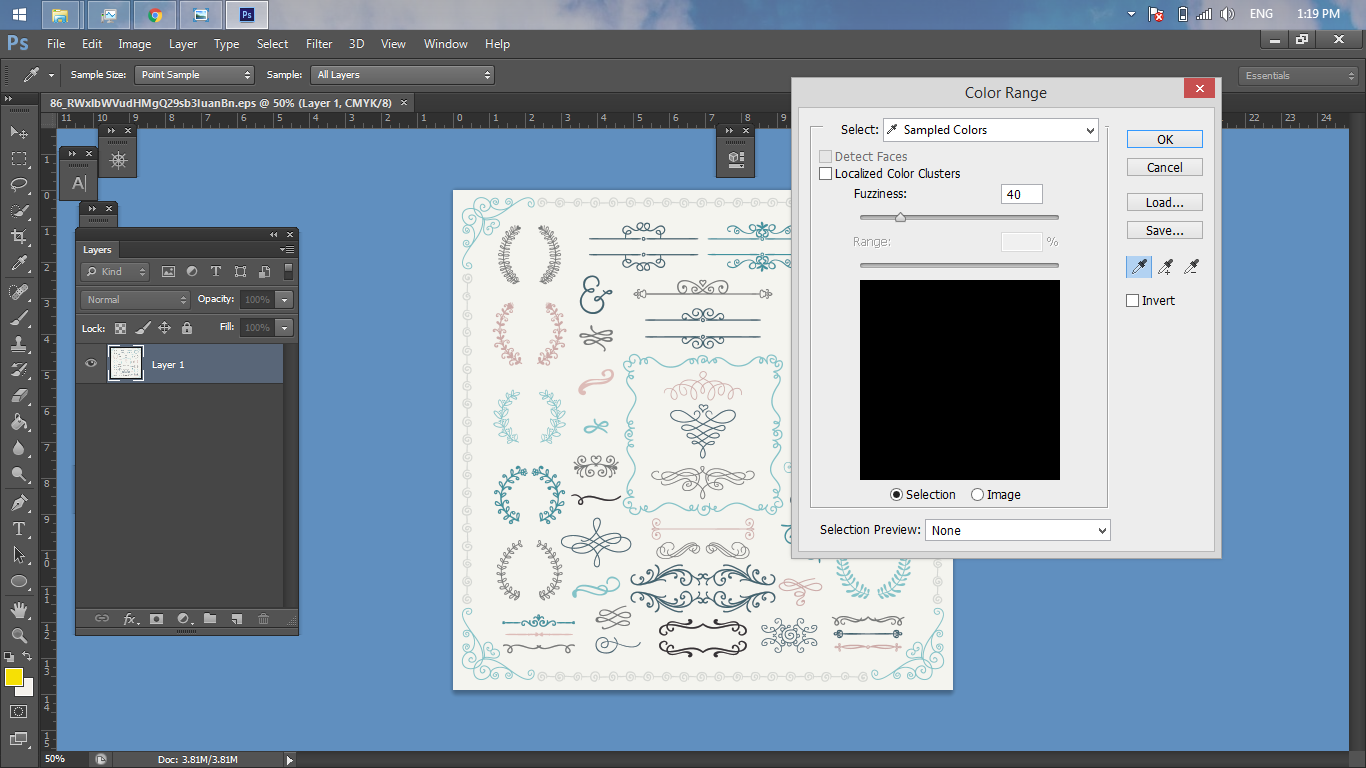
A panel appears as shown.
Use the eyedropper to click the white background of the file.

A panel appears as shown above.
Click OK.

Then press CTRL SHIFT I to invert the selection, then press CTRL J
Use any tool you can use to make a selection (the selection here will be the vectors you want to use)
I’m used to the Marqueee Tool, shortcut M.

Finally, use the Move Tool (shortcut V) to cut and move the vectors.
I hope you create beautiful work,
Thank you.
Download link:
https://drive.google.com/open?id=0B9uiHkOo8QHmb1Awdl90N3gtZ28
Do it like your way!
Have a question? Ask the groupFacebook group Ask Anything (in Vietnamese): free Q&A on any topic, with real answers.Join the group →

Hoang Ngoc Quang Anh
Sharing computer, Windows and software tips. If you have a question, leave a comment below.