

👁 0 views
[Here is a free utility that lets you create your own portable versions of software already installed on Windows.
Portable versions of software let you launch a program quickly without worrying about installing it on Windows. You can also easily store it anywhere that is convenient for you to use.
Although some developers already provide portable versions of their software, these are fairly rare. As a result, it can be hard to find a portable version of the software you need. With P-Apps, however, this becomes easier. P-Apps is a free utility that creates portable versions of software already installed on a Windows computer. If you want to know how to use P-Apps, follow the guide below.
First, download P-Apps:

After the download finishes, run the downloaded package to extract it.

When extraction is done, find the executable file “P-Apps.exe” and launch it

The P-Apps window appears. P-Apps walks you through the steps here. On the first screen, click PreScan so P-Apps can take a snapshot of the registry keys and system files. This process may take a few minutes.

When the scan and snapshot are done, click Next to move on to Post Scan. Here, download and install the software you want to make a portable version of. To save time, you should have that software’s installer ready beforehand.
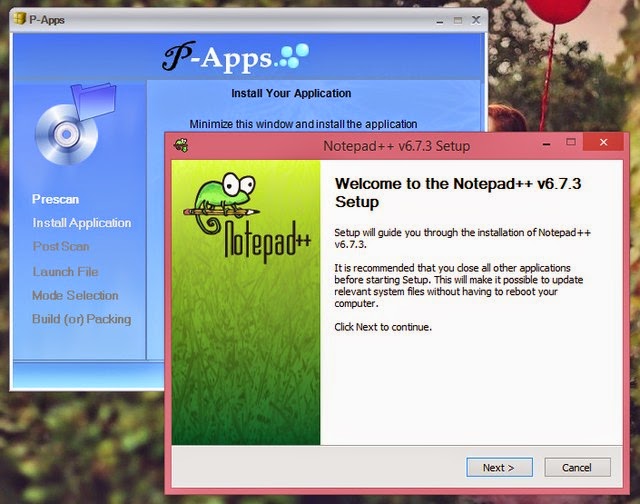
When the software is installed, click Next.

In the next window, a list of the software you just installed appears. Check the software you want to make portable versions of and click Next.

Next, select High Secured and click Next. Then choose where to save the exported portable package. Finally, click Finish so P-Apps starts working and creates the portable version of the software you selected in the save location you set earlier.

Pretty simple, right? I hope this article is useful to you.
Source:http://genk.vn/

Sharing computer, Windows and software tips. If you have a question, leave a comment below.


